SEARCH
Enter keywords, product name, or question
- Confirm the tool is plugged in and switched on at the mains power. Then check the tool is switched on.
- If the tool remains inactive, check the reset button hasn't been tripped by pressing it for 1 sec. The black round “Reset” button is located next to the “Stop” button on the top front panel of the tool. (Refer to item 5 in fig. 8 below).
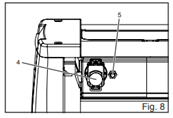
- The tool Reset may trip if the motor overloaded or overheats.
- Where the tool has power and hasn't reset, then the tool may have a fault.
If the issue persists and your product is still within the warranty period, take it back to the retail store along with your receipt or proof of purchase for warranty assessment.